Another day of envy for Mac users.
This morning, OpenAI officially released a new version of Codex for macOS, stating:
Codex for (almost) everything.
It can now use apps on your Mac, connect to more of your tools, create images, learn from previous actions, remember how you like to work, and take on ongoing and repeatable tasks.
In short: the Mac version of “native lobster” is here.
Since bringing in the founder of OpenClaw in mid-February, OpenAI has been integrating OpenClaw’s capabilities into Codex, and we are finally seeing results, launching with a bang.

Let’s take a look at what the latest Mac version of Codex can do.
From Developer to Maintainer: Codex Achieves Full Automation
OpenAI’s demo video of Codex first showcases its autonomous development and debugging capabilities in a Mac environment.
Users issue a command to Codex: test a “Tic Tac Toe” application and fix all bugs. Upon receiving the command, Codex autonomously opens the local Xcode project on the Mac, clicks through the Tic Tac Toe project grid, locates the program code, and executes the launch command.
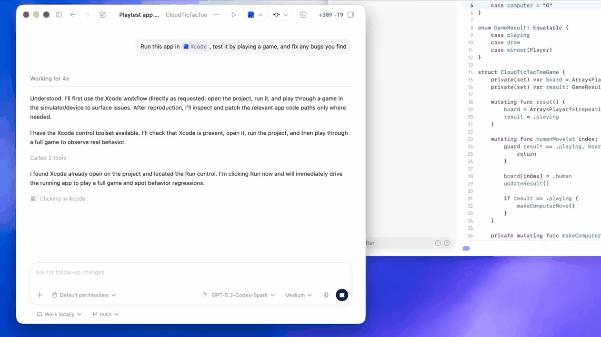
This demonstrates that Codex is not simply invoking test code through a backend API; it is genuinely using the application through the graphical user interface (GUI) like a regular user. The difference is: the former only indicates it has solved command understanding and code execution issues, relying on the application’s open API; the latter can complete tasks through graphical recognition without needing to call the application’s API.
This means Codex possesses a true “general execution capability” because many third-party applications do not provide open APIs. For previous AI, these applications were a “black box”; it knew of their existence but could neither operate nor read them.
Moreover, this showcases OpenAI’s powerful multimodal visual recognition and coordinate mapping capabilities. Codex can “understand” UI elements on the simulator and determine which pixel coordinate to click on the screen to make a move.
Next, Codex automatically enters testing and directly identifies a bug: “When the human makes a move, the computer opponent makes two moves.” This is the most impressive part of the entire demonstration because Codex did not reference any error documentation; it entirely relied on visual observation and logical reasoning of the game rules to identify the application’s behavioral bug.
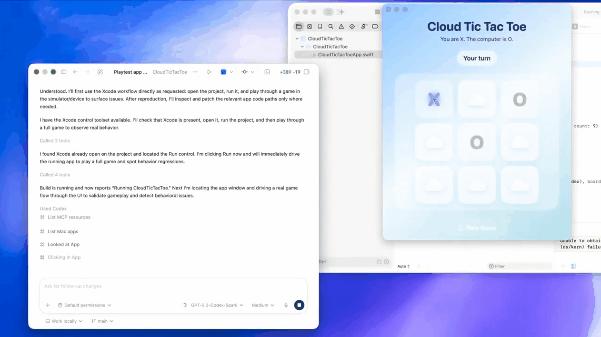
To some extent, this indicates that Codex has a degree of autonomous decision-making and “human-like” reasoning ability. After identifying the problem, it begins to fix the Tic Tac Toe program, recompiles the program, and confirms the bug is fixed. In another video, Codex uses a code assistant plugin to autonomously explore local frontend projects without explicit file path prompts and provides a minimal code modification plan.
OpenAI has intuitively demonstrated Codex’s complete workflow capability from frontend to backend through these two simple cases. And all of this is accomplished through visual recognition of the graphical interface, indicating it has nearly comprehensive full-process development capabilities across all development environments.
Honestly, this is a bit frightening. Previously, using Codex to develop applications required some programming knowledge to solve API integration issues, but now you can skip these processes and let Codex operate the computer like a “real person” and generate the programs you want.
Not Just a “Producer”, But a “Collaborator”
Another video showcases Codex’s execution capabilities at a multimodal level. In this video, the user asks Codex to generate an image for the main visual area of a webpage without specific style prompts.
So how does Codex accomplish this? It does not generate an unrelated image; instead, it first reads the local project files and, combining information from the graphical interface, determines that the webpage’s theme is “Late-night Fast Food in Philadelphia” and generates an image of “burger + fries + late-night lights” based on that.

Furthermore, Codex analyzes the layout requirements for the “main visual area”. To avoid obscuring the text on the left, the generated image needs to leave enough space on the left side, with the visual focus shifted to the right. This is something previous AIs struggled with, as most development tools were still in the “pure text code generation” phase, unable to understand visual elements on webpages or even requiring users to manually specify image generation and path inclusion.

Once the image meets the requirements, Codex automatically executes the command to move the generated image to the local project folder and modifies the HTML file, replacing the original placeholder with a real image tag and local path; it also fine-tunes the CSS styles to ensure the image perfectly fits the webpage size, and finally refreshes the built-in browser to display the final webpage effect.
OpenAI also demonstrated how Codex can autonomously build a webpage. Upon receiving a user request to develop a “Lego Tracking Web Application”, Codex calls the development software to complete the code writing and automatically starts the local development server, loading the page in Codex’s built-in browser panel.
Subsequently, users can directly tell Codex their requirements, and it will adjust the corresponding elements of the webpage based on the data obtained through graphical recognition. For example, in the video, the user simply provided the request to “reduce the font size” in the corresponding editing box, and Codex automatically completed the font reduction, re-layout, and other steps, truly achieving “what you see is what you get”.
For web developers, Codex’s role has fundamentally changed. Previously, it was seen more as a “code producer” for debugging and webpage framework construction, with final integration still requiring human intervention.
Now, it has become your “collaborator”; you can delegate more work to it. Even if it involves specific visual element modifications and UI tweaks—previously, AI might have struggled to accurately understand your intentions, but now it’s different because it can also “see” the webpage.
Your Personal Assistant is Live
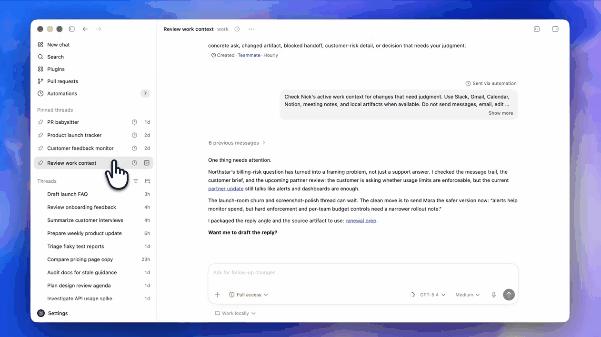
In the last two video demonstrations, OpenAI aims to make Codex your “personal assistant”. In the video, the user only needs to say one sentence for Codex to simultaneously search across four distinct SaaS platforms: Slack, Gmail, Google Calendar, and Notion.
Then, based on its semantic understanding capabilities, Codex autonomously analyzes notifications and information from each platform, prioritizing and categorizing the information into “urgent” and “can be postponed”; it also alerts the user that some information, although appearing to be routine reports, involves matters needing approval and requires extra attention.
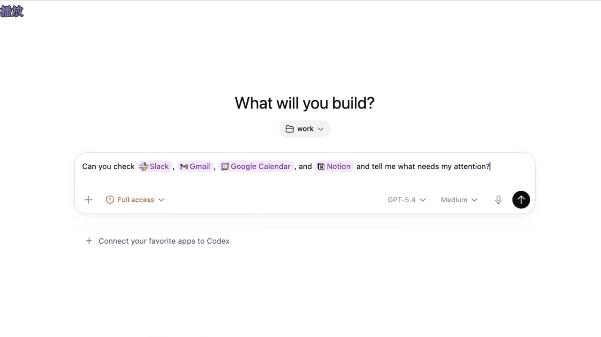
After summarizing and categorizing the information, the user issues a new command: “keep monitoring and notify me.” Codex directly establishes a background task named “Teammate - Hourly” and automatically sets the specific operating rules for this background task: check each SaaS platform every hour and only notify the user when substantial new information arises (or when it cannot obtain the latest information).
This functionality is essentially what made OpenClaw popular—an all-automated background “employee”. Just issue a command, and Codex will continuously monitor and execute related tasks in the background without requiring the user to take proactive action, transforming AI from “passive response” to “active assistance”.
Moreover, Codex’s automated operations can run in the same thread; simply open the corresponding chat box, and the AI can repeat or continue executing previous tasks without needing you to reassign the work. So, don’t underestimate the simplicity of the video demonstration; as long as the provided instructions are detailed enough, Codex can execute complex automated workflows like OpenClaw.
The video also demonstrates that when Codex detects a new email, it directly provides a summary of the email content and asks the user if they need help drafting a reply, showcasing its ability to infer and set tasks based on user requirements.
In the final video, Codex, based on the user’s request, accesses the company’s internal knowledge base through plugins, finds the corresponding product report, and generates a briefing for executives. Throughout the process, the user only provided the product name and what they wanted Codex to do, without mentioning where the product report was stored or how to find it.
Fully automated addressing, rapid retrieval of various documents and images, extracting key information, and generating documents. The user only needs one sentence, and Codex autonomously breaks down and executes multiple steps; it does not require the enterprise to provide private API interfaces, only using the user’s existing permissions to access documents, minimizing the risk of data leakage.
Of course, Codex now also has the capability to directly create corresponding documents. In the video, Codex organizes the recent issues from a web-based GitHub project by topic into a spreadsheet and outputs it as an Excel file. Combined with the aforementioned capabilities, you can think of it as an efficient “data collector”, capable of gathering and summarizing data from private repositories to public data, then directly calling it in other tasks.
Currently, Codex has integrated over ninety mainstream office and development plugins, allowing users to call them freely in the chat box. What more can be said? Just get it done.
Why macOS?
Honestly, the latest version of Codex from OpenAI is more suitable for most users than OpenClaw. Because it does not require users to provide system-level permissions, sacrificing security and privacy for convenience; instead, it leverages macOS’s comprehensive accessibility API and underlying sandbox controls to achieve stable and secure operation. This is something currently unattainable on Windows (where permission management is complex and APIs are chaotic).
Moreover, Codex has clearly undergone deep integration with Apple’s official development tools. It can not only directly read the structure of Xcode projects but also manage Swift package dependencies and simulator states, while automatically calling Apple’s official development documentation and API specifications for real-time error correction (which is crucial for Apple developers).
Another very critical factor is the Apple ecosystem. Many discussions about AI agents overlook the impact of hardware ecosystems. Imagine if you forgot to open the remote desktop program while letting AI execute a task on Windows; you would generally have to walk over to the computer to operate it. In contrast, the collaboration between Mac, iPhone, and iPad allows users to easily view Codex’s work results on mobile devices and easily issue new commands.
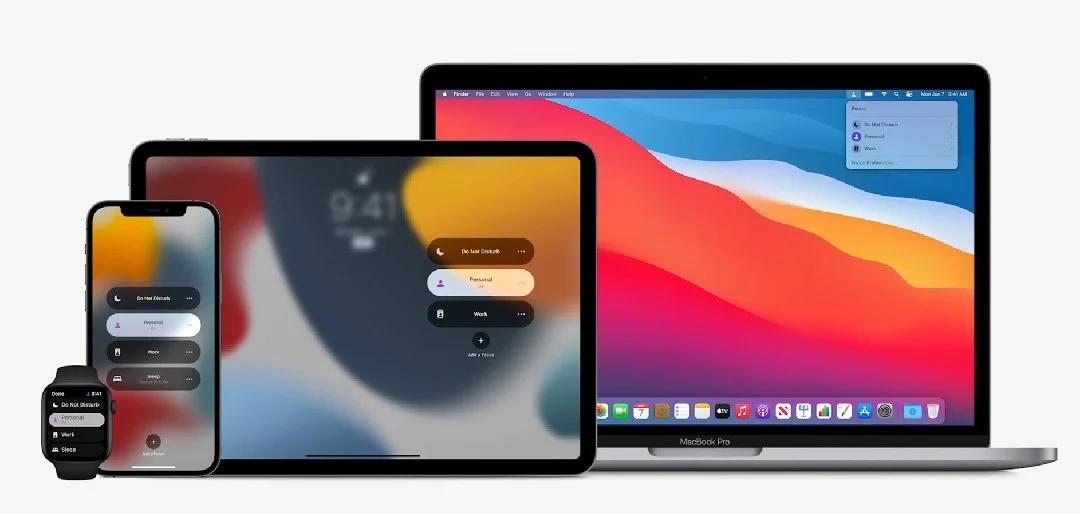
When you assign Codex to work at home while you go out to enjoy yourself, the native remote management experience is undoubtedly better than third-party tools (though Apple Remote Desktop is indeed expensive).
In summary, the release of the Mac version of Codex essentially marks the point where this AI tool has officially crossed from being a “passive assistant” to becoming a direct “all-purpose intelligent agent” that takes over the system desktop.
It is no longer a tool that requires you to rack your brain to solve API interfaces and various usage issues; it is a tool that can understand the screen, autonomously operate different software, and even help you coordinate cross-platform work as a “cyber colleague” (suddenly wondering, can Codex help me beat Cyberpunk 2077?).
The pressure is now on Microsoft’s old rival, Windows. When will it launch similar features? Copilot has been tinkering for a year or two and is still the same; it truly does not live up to the resources Microsoft has invested.
Comments
Discussion is powered by Giscus (GitHub Discussions). Add
repo,repoID,category, andcategoryIDunder[params.comments.giscus]inhugo.tomlusing the values from the Giscus setup tool.